
Log the call before the next one
Two taps after each session: log it, send the check-in. The record is complete before you close the tab.
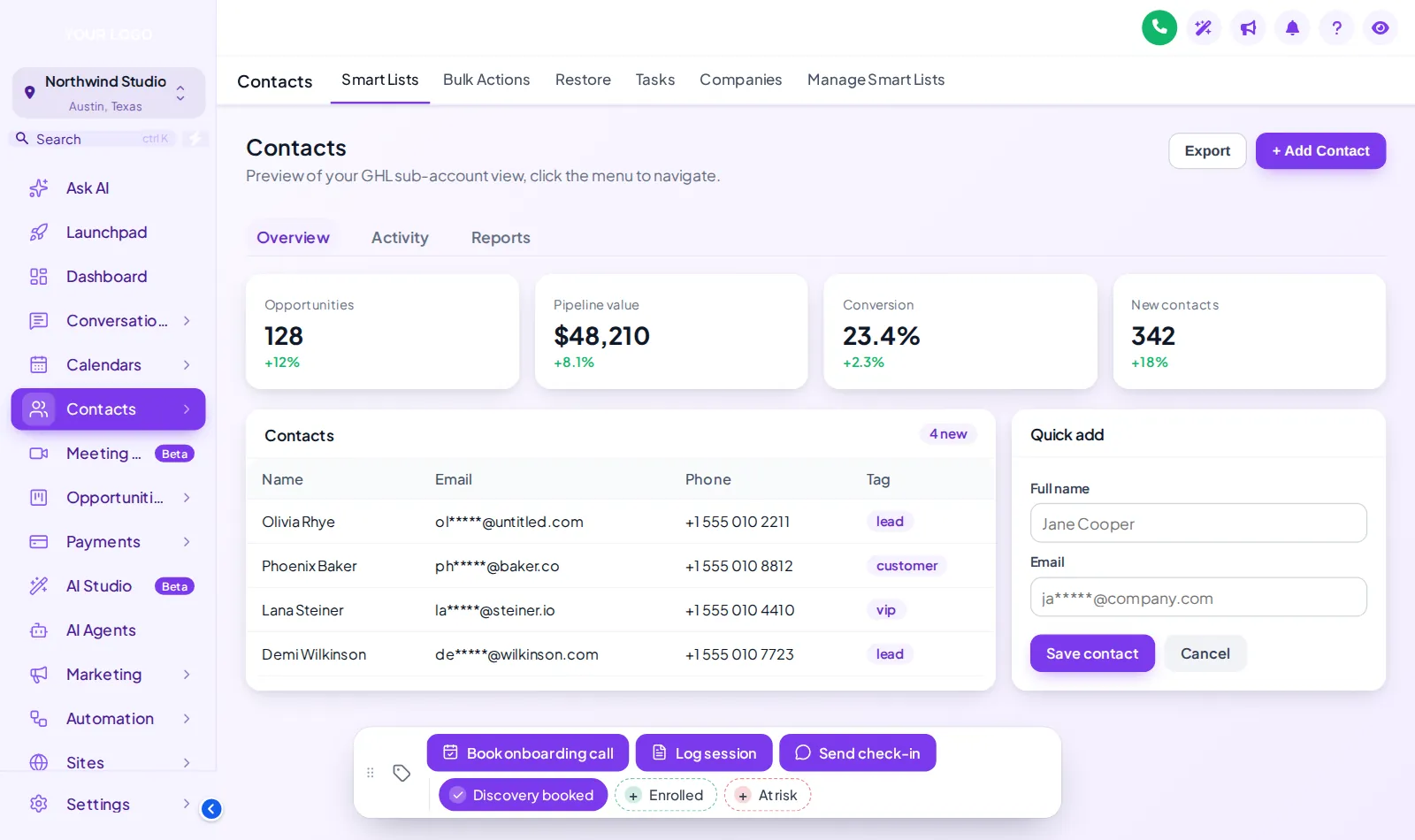
After a coaching call nobody wants to hunt through a tag list. With your customizer account you put the actions your team repeats every day on a bar at the bottom of every contact record, styled to your brand and wired to the workflows you already run.
Illustration with sample names and actions.
Contact action buttons are a branded bar on every GoHighLevel contact with quick tags and buttons that add tags, fill custom fields and so start your existing workflows in one tap. You build the set for your coaching process in a live editor and install it with one line, as part of Momentum and Mastery, from $547 one-time.
This is an illustrative set for a group programme. Yours is built from the tags and workflows already in your account, or from the ones in the coaching snapshot workflows.
| On the bar | Type | Tag or field | What your workflow can do next |
|---|---|---|---|
| Book onboarding call | Button | onboarding call | Sends the onboarding calendar link and the welcome pack |
| Log session | Button + form | (custom fields) | Saves programme, session date and next milestone to the record |
| Send check-in | Button | weekly check-in | Starts the accountability check-in message |
| Discovery booked | Quick tag | discovery booked | Moves the deal and starts call reminders |
| Enrolled | Quick tag | enrolled | Kicks off cohort onboarding |
| At risk | Quick tag | at risk | Alerts the coach and pauses promotional messages |
The bar below is the real one, loaded with the coaching set from the table. Toggle a tag, open Log session, drag the bar or try another position. Nothing is saved.
Loading the live preview…
Buttons and quick tags the real contact action bar. Tap a quick tag to add or remove it, press Log session to open its form, or drag the bar by its grip. Nothing is saved in the preview.
Adding a tag in GoHighLevel means opening the tag field, typing, picking the right one out of fifty and hoping the spelling matches the workflow trigger. Multiply by every call, every client, every week.
Two taps after each session: log it, send the check-in. The record is complete before you close the tab.
A new VA sees the five actions that matter, labelled in your words, instead of learning which tag means what.
Quick tags for interviewed, accepted and renewal due keep the whole operations team on the same page.
Give each coaching client a bar tuned to their process. It makes your white-label account feel built for them.
If your workflows are not built yet, the coaching snapshot ships them ready to trigger, and our GHL development team can build custom ones.
The contact actions bar is in Momentum and Mastery. One-time payment, lifetime access, no monthly fee.
Your customizer login arrives within minutes (max 24 hours). Before you sign in, jot down the five or six tags and notes your team adds by hand every week.
Turn each job into a quick tag or a button (add tags, remove tags or open a short form that fills custom fields), pick one of 6 positions and match the chip colours to your theme. Your existing workflows trigger on those tags as before.
Add your line to Agency Settings → Company → White Label → Custom JS in about 2 minutes. Test each action on a real contact; later changes go live without re-installing.
From Momentum upwards. One-time prices, lifetime access.
Stage 1
$247one-time
Brand the whole app and the login page yourself: every theme, UI kit, dark mode and all 16 login designs.
contact action buttons is not in Clarity
Best for: Solo coaches and new practices who want a branded app and login page.
Stage 2
$547one-time
Clarity plus the daily workspace: mega and floating menus, dashboard and pipeline designers, and the contact actions bar.
Includes contact action buttons
Best for: Group programmes, masterminds and agencies who hand GoHighLevel to coaching clients.
Stage 3
$1,047one-time
Everything: popups, social proof, calculators and floating widgets on top of Momentum, plus white-label branding of the editor.
Includes contact action buttons
Best for: High-ticket programmes, mastermind operators and coaching agencies selling a branded platform.
One-time prices in USD, lifetime access, no monthly fee. Compare every module, stage by stage
How the bar connects to the workflows you already run.
They are a small bar on the GoHighLevel contact page with quick tags and buttons. One tap adds or removes a tag, opens a short form that saves to custom fields, or both. Because workflows can trigger on tags, a button can start almost any automation you already have.
No. They are a faster way to start them. The workflow still lives in GoHighLevel and still triggers on a tag being added; the button just saves your team from searching the tag list every time.
Yes. A button can open a short form, such as programme, session date and next milestone, and save the answers straight into the contact’s custom fields. That is handy for session logs and progress notes.
The usual set is: book the onboarding call, log a session, send a check-in, and quick tags for discovery booked, enrolled and at risk. Masterminds often add an application status; agencies add the actions their coaching clients ask for most.
Yes. There are 6 fixed positions to choose from, and the bar can be made draggable so each person can move it by its grip.
The contact action bar is included in Momentum and Mastery. Momentum is $547 one-time with lifetime access, and also unlocks the dashboard and pipeline designers and mega menus.
No. You get your own customizer login within minutes (max 24 hours), build the bar yourself and paste one line into GoHighLevel. The help docs and support cover anything you get stuck on.
Quick tags toggle, so a second tap removes the tag again, and each action shows a confirmation. It is still wise to keep anything that sends an email to a client on a clearly labelled button rather than a tag chip.
If you are an agency and the bar is set up for a client sub-account, yes, their team sees it on their contacts. For a coach on their own account, only you and your team see it.
It works in the browser version of GoHighLevel on laptops and tablets, and adapts to smaller screens. The LeadConnector mobile app is native and does not load it.
GoHighLevel and HighLevel are trademarks of HighLevel, Inc. GHL Business Coaching Snapshot is an independent product team and is not affiliated with or endorsed by HighLevel, Inc. The customizer platform is run by GHL Customer Care.
Manage how we use cookies. Necessary cookies keep the site working and can't be turned off.
Saved on this device. Press Esc to close.