

Limited-time offerOffer ends in00d00h00m00sClaim now →

03 Module 03 / 10 · Menus

GoHighLevel sidebar menu customization, in your programme's words

A new client opens GoHighLevel and meets a long list of tools named by a software company. They need four of them. With your own customizer account you reshape the menu around how your programme actually runs: your names, your order, your layout.

Try the layouts

Stock menu 18 items

  • Launchpad
  • Dashboard
  • Conversations
  • Calendars
  • Contacts
  • Opportunities
  • Payments
  • AI Agents
  • Marketing
  • Automation
  • Sites
  • Memberships
  • Media Storage
  • Reputation
  • Reporting
  • App Marketplace
  • Mobile App
  • Settings

Programme menu 6 items

  • Today
  • ApplicationsOpportunities, filtered
  • Discovery callsCalendars
  • ClientsContacts
  • Programme
  • CohortsMemberships
  • Check-insConversations
  • BillingPayments
Short answer

GoHighLevel sidebar menu customization means renaming, reordering, grouping and hiding menu items, then choosing where the menu lives: a left sidebar, a right dock or a top bar in 8 styles, with sub-menus or 8 mega menu styles. You do it yourself in a live editor and install it with one line of code.

The cost of the stock menu

Every "where do I find…?" email is a menu problem

It is a familiar story: clients who log in once, cannot find the thing they were sent to do, and email instead. Assistants who click into Marketing looking for check-in messages. A clear menu answers those questions before they are asked.

Before

  • Every tool listed for everyone, used or not
  • GoHighLevel's names, which mean nothing to a coaching client
  • Sub-pages hidden in tab rows that nobody notices
  • One layout, whatever your brand or screen size

After

  • Only what each view needs, under clear headings
  • Programme words: Applications, Cohorts, Check-ins
  • Mega menus that show a whole section at a glance
  • Sidebar, right dock or top bar, chosen for your brand
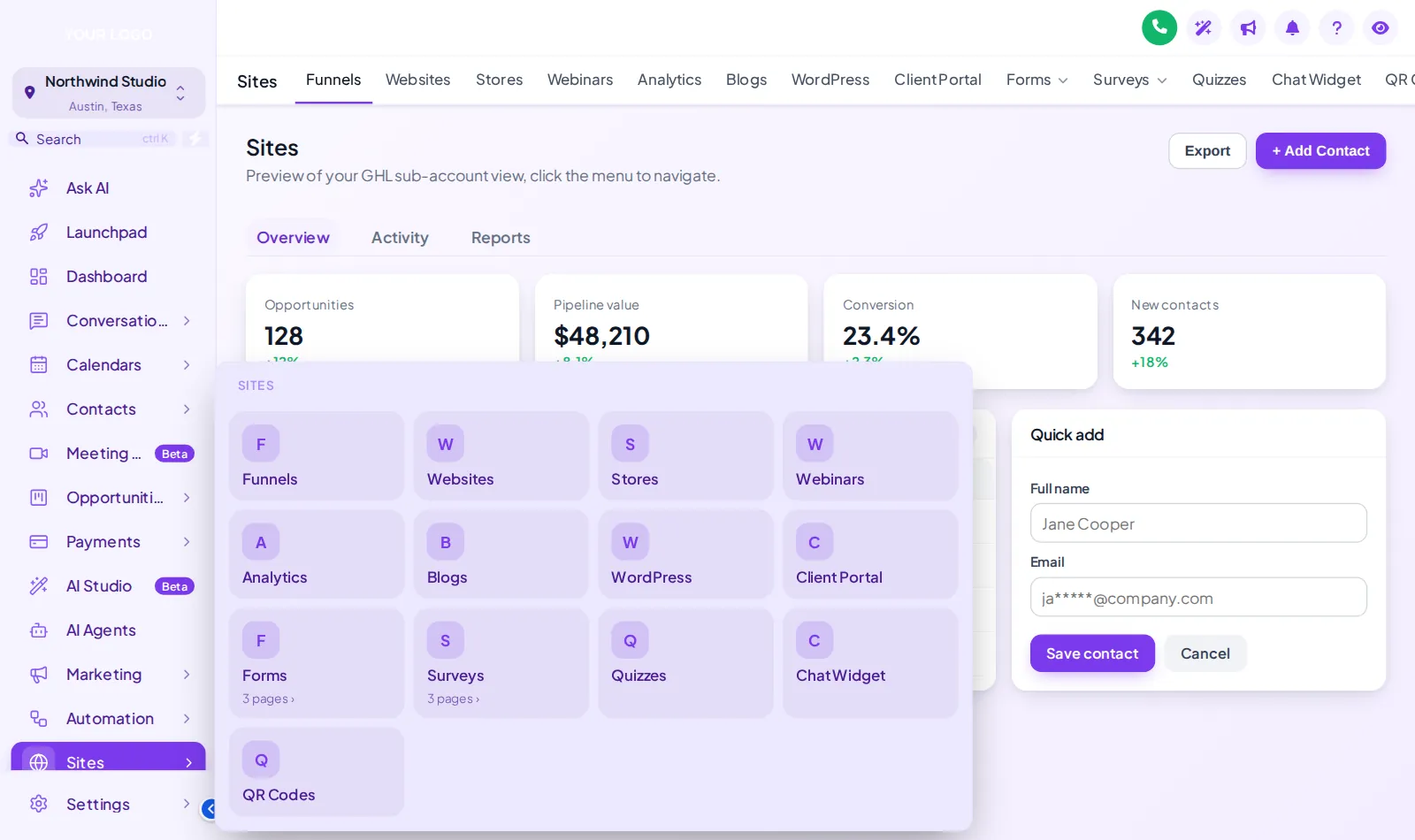
GoHighLevel sidebar in the Lavender Dream theme with the Sites section opened as a tiled mega menu
A tiled mega menu shows every page in a section at a glance.
Mega menus · 8 styles

Show a whole section at once

GoHighLevel tucks a lot behind single menu items. Sites alone holds funnels, websites, forms, surveys and more. A mega menu opens that section as a panel, so the page you need is one click away rather than two clicks and a search.

  • Columns and split for sections with many pages
  • Tiles and tabs when icons help people find things fast
  • Icon rail and full-width band for top bar layouts
Coaching use cases

Menus shaped by the way you deliver coaching

1:1 and high-ticket

Pipeline first, everything else second

Applications and Discovery calls sit at the top, because in a high-ticket practice that is where the week is won or lost. Tools like reputation and media storage move down or out of sight. It pairs naturally with the application funnel in the coaching snapshot.

Group programmes

Cohorts and check-ins up front

During a cohort the work is onboarding, check-ins and community. A top bar with Cohorts, Check-ins and Billing keeps the whole team on the same few pages. More on group coaching.

Masterminds

A members-only feel

A slim, dark top bar with a merged header gives a mastermind portal more screen space and a calmer, premium feel. Add a link to the member community so it lives inside the portal.

Agencies serving coaches

Two menus: yours and theirs

Your team keeps the full agency menu. Each coach sees a short, branded sub-account menu that makes the platform feel built for them, which is a far easier thing to sell under a reseller licence.

Floating quick menu · 3 layouts · 8 designs

Five shortcuts, on every page

For the assistant who flips between contacts, conversations and calendars all day, a floating quick menu puts those pages one click away from anywhere. Click the bubble inside the preview, hover the dock or rail, and drag it by its grip.

How it works

From a long tool list to a programme menu

Sketch who opens what in a normal week, then shape the menu in the live editor of your GHL Branding Customizer account. Change it again whenever the programme changes.

  1. Choose a package and pay

    Sidebar and top-bar layouts are in every account from Clarity; mega menus and the floating quick menu start at Momentum. One-time payment by card.

  2. Get your login by email

    Your customizer account login arrives by email within minutes (max 24 hours). Sign in and set your own password.

  3. Customise in the live editor

    Rename and regroup items in your programme words, pick a left sidebar, right dock or one of 8 top bar styles, then add mega menus or a floating quick menu. The live preview shows each change.

  4. Paste one line into GoHighLevel

    Paste the loader line into Agency Settings → Company → White Label → Custom JS (about 2 minutes). After that, every menu change you save is live on the next page load.

Where it fits

Menus start at Momentum

Every account gets sidebar and top-bar layouts; Momentum adds mega menus and the floating quick menu. Compare every module on the pricing page.

Questions

GoHighLevel menu questions

Renaming, hiding, mega menus and what happens when GoHighLevel changes.

Yes. Every menu item can take your own name and icon, so "Opportunities" can read "Applications" and "Conversations" can read "Check-ins". The page behind it is unchanged; only the label and position in the menu are yours.

Yes, per view. Items can be hidden from the sub-account menu or the agency menu. Hiding is a layout change in the browser, not a permission change, so for genuine access control you still use GoHighLevel user roles alongside it.

Yes. The menu can live in a left sidebar, a right-hand dock or a top bar, and the top bar comes in 8 styles from solid to glass, segmented and slim. A merged header saves a whole row of screen space on laptops.

A mega menu opens a section such as Sites or Payments as a panel that shows every sub-page at once, instead of a tab row clients never notice. There are 8 styles, including columns, tiles, tabs, an icon rail and a full-width band. Try them in the preview above.

Yes. Custom links can sit in the menu next to GoHighLevel pages, for example a link to your community, a resource library or your booking page, so clients do not hunt through emails for it.

They can. The agency view and the sub-account view are configured separately, which is useful for agencies: your own team sees the full agency menu, while each coach sees a short, programme-shaped menu inside their account.

It is a small menu that floats over every page, as a bubble, a dock or a rail, holding the handful of pages people open most. It can be dragged anywhere and comes in 8 designs.

New GoHighLevel items appear in the menu as GoHighLevel adds them, so nothing disappears silently. If one arrives that your clients do not need, you hide or move it in the editor in a couple of minutes.

Every account, from Clarity ($247), can switch between sidebar and top-bar layouts. Mega menus and the floating quick menu are part of Momentum and Mastery; Momentum ($547) is the first package with them, along with the dashboard and pipeline designers.

No. Everything is done in the live editor with a preview. The only code is one line you paste into GoHighLevel once, which takes about 2 minutes; after that, menu changes go live when you save. Help docs and support are there if you get stuck.

Module 03 · Menus

Give every client a menu they can find their way around

Momentum adds mega menus, the floating quick menu, and the dashboard and pipeline designers to every theme and login design. One payment, lifetime access, login by email within minutes (max 24 hours).

Compare packages

One-time payment · lifetime access · login emailed within minutes (max 24 hours) · secure checkout by Stripe

GoHighLevel and HighLevel are trademarks of HighLevel, Inc. GHL Business Coaching Snapshot is an independent product team and is not affiliated with or endorsed by HighLevel, Inc. The customizer platform is run by GHL Customer Care.

GHL Branding Customizer · lifetime account

Get your customizer account

Choose your stage
One-time, lifetime accessMomentum · $547

Secure card payment by Stripe. We never see your card details. Your login is emailed to this address within minutes (max 24 hours). We never ask for your GoHighLevel password.

Book DemoGet Snapshot