


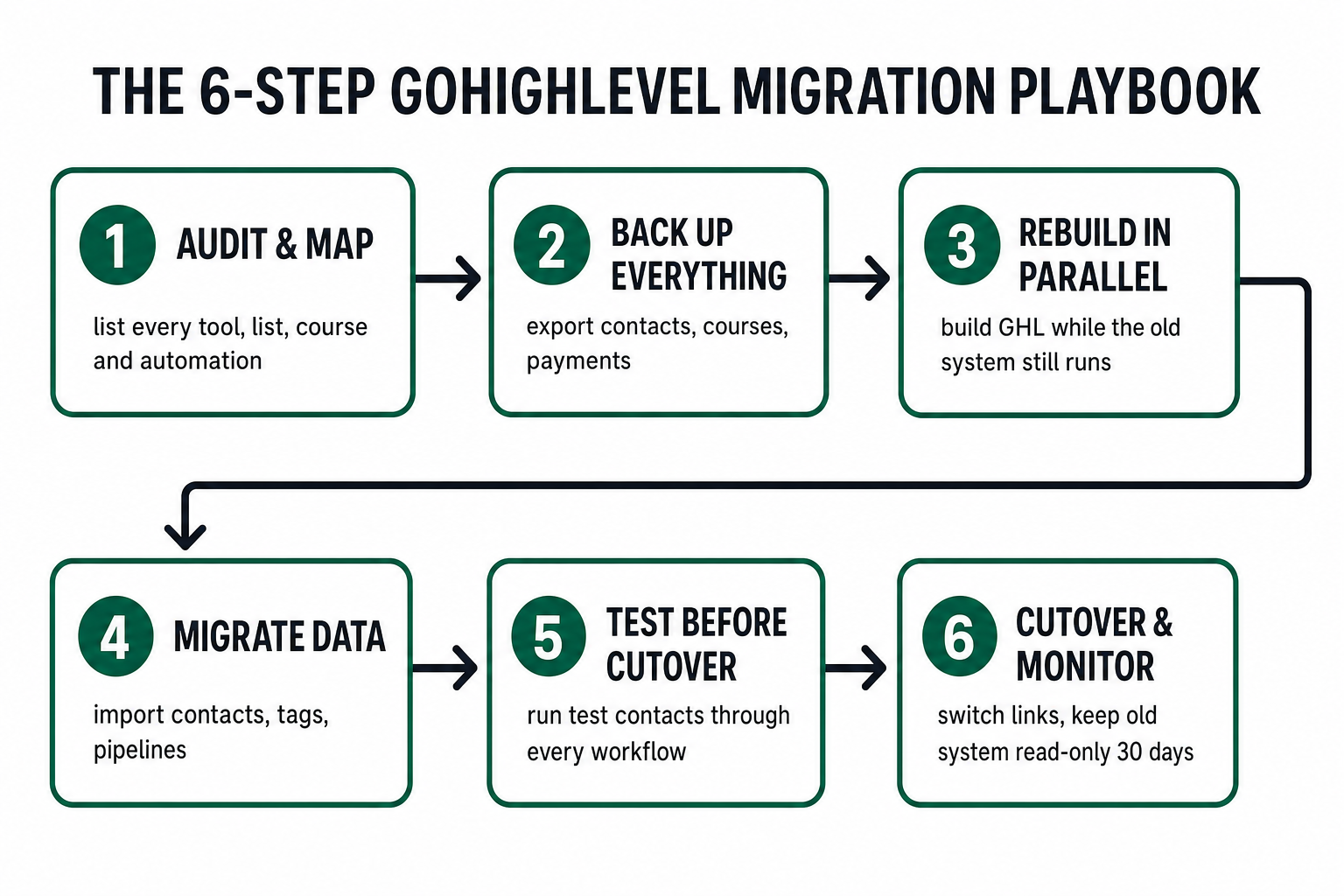
To migrate a coaching business to GoHighLevel without losing clients, you run six steps in order: audit and map your current stack, back up every record, rebuild your funnels and workflows in GoHighLevel in parallel while the old system still runs, migrate contacts and course data, test every automation with dummy contacts, then cut over and keep the old platform read-only for 30 days. The mistake that loses clients isn’t switching to GoHighLevel (GHL) — it’s switching in a hurry, with no map and no backup. This is a how-to post: the exact sequence a Phoenix, Arizona business coach can follow to consolidate Kajabi, Teachable, Thinkific, a scheduler, an email tool, and three spreadsheets into one GoHighLevel account — and the two or three places where a botched migration quietly drops a paying client.
Why coaches migrate to GoHighLevel in the first place
Most coaching practices don’t choose a messy tech stack — they accumulate one. You start with a scheduler. You add an email tool. You launch a course on Kajabi, run a community on Circle, take payments through Stripe, capture applications on a form builder, and track it all in a spreadsheet you swear you’ll clean up. Each tool made sense the week you bought it. Together, they became a second job.
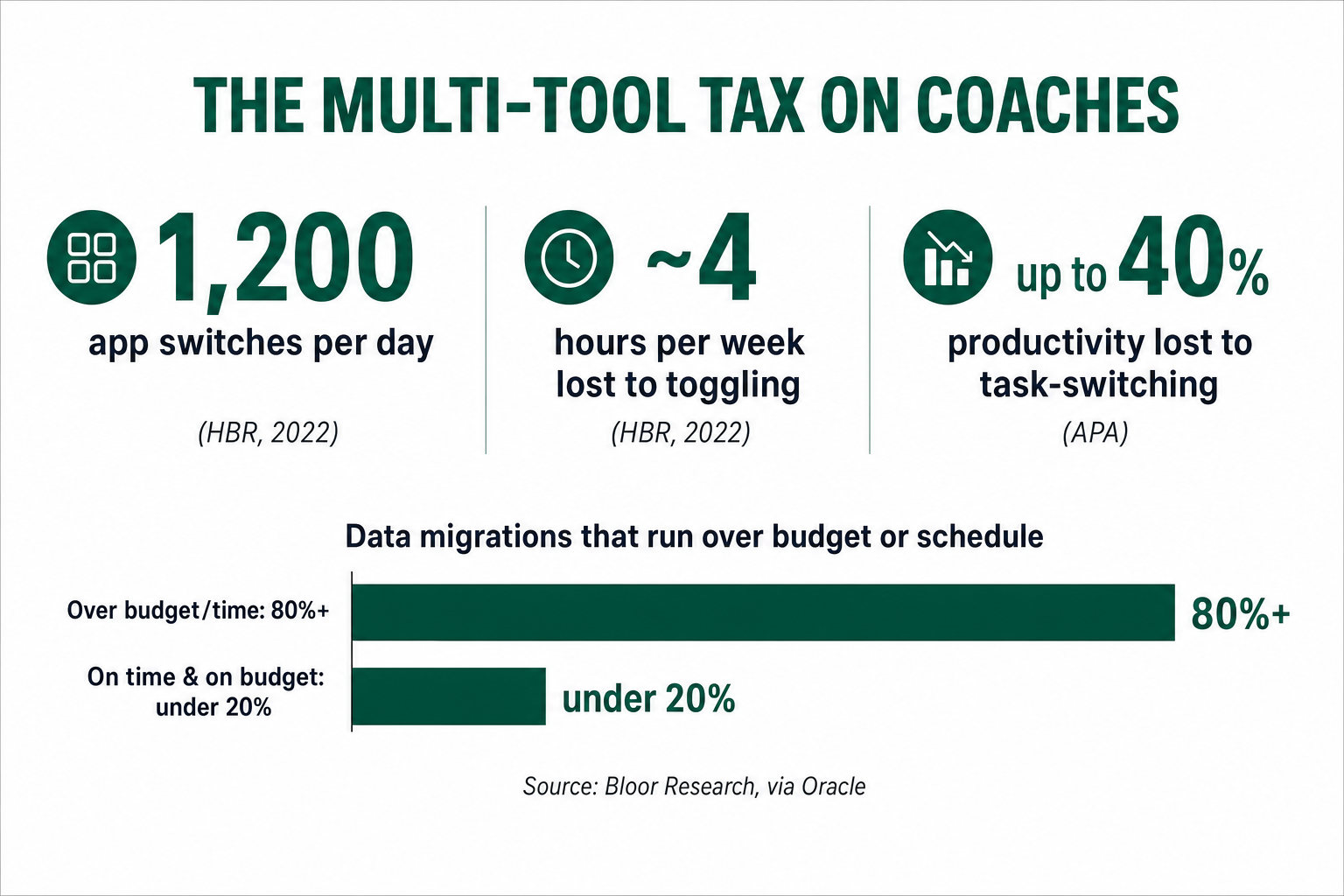
The cost of that sprawl isn’t just the stack of monthly invoices — it’s the switching. Research from Harvard Business Review found that knowledge workers toggle between applications and websites around 1,200 times a day, and that reorienting after each switch adds up to just under four hours a week — about 9% of their working time (HBR, 2022). For a coach whose calendar is already full of sessions, that’s most of a workday every week spent copying a name from one tab into another.
Share of the working week lost purely to toggling between applications. Source: Harvard Business Review, “How Much Time and Energy Do We Waste Toggling Between Applications?” (2022).
And that’s before the cognitive tax. The American Psychological Association’s research on task-switching found that mentally jumping between activities can cost as much as 40% of someone’s productive time (APA). A coach who is reconciling a failed payment in Stripe, then a no-show in a calendar app, then a course-access ticket in Kajabi, isn’t doing three jobs efficiently — they’re doing one job badly, three times.
GoHighLevel’s pitch is consolidation: your CRM, pipelines, calendars, forms, email and SMS, course/membership areas, and payment recovery in one account, wired together so an application on a form can tag a contact, book a call, and start an onboarding sequence without you touching a keyboard. That’s the why. Migrating well is the how — and it’s where coaches get hurt. (If you’re still deciding between the two platforms, start with our honest GoHighLevel vs. Kajabi comparison for coaches before you move anything.)
The real risk: most migrations go over, not wrong
Here’s the uncomfortable industry backdrop. Independent analyst firm Bloor Research, in work summarized in an Oracle white paper, found that more than 80% of data-migration projects run over time or over budget — with cost overruns averaging around 30% and schedule overruns around 41% (Bloor via Oracle). (That research skews toward large enterprise migrations and predates 2022, so read it as directional — but the direction is exactly what every coach who has ever “quickly moved a course over the weekend” already knows.)
Average overruns on data-migration projects (percent). Source: Bloor Research, via Oracle data-migration white paper. Enterprise-weighted and pre-2022 — directional for a small practice.
Notice what those numbers aren’t: they’re not “80% of migrations lose your data.” A well-run migration rarely destroys records — it drags on, blows the timeline, and creates a fragile in-between period where half your contacts live in the old system and half in the new one. That limbo is where clients slip: the welcome email that fires from Kajabi and GoHighLevel, the reminder that fires from neither, the subscriber whose card fails during the switch and never enters recovery. The failure mode for a coach isn’t a dramatic data loss. It’s a quiet, expensive month of double-sends, dropped reminders, and one high-ticket client who emails “hey, I can’t access my course” — and doesn’t renew.
The fix is not to be braver. It’s to be sequenced. Everything below exists to keep you out of that limbo.
Why Phoenix coaches especially benefit from one clean system
If you coach in Phoenix, you’re operating in one of the country’s fastest-growing small-business markets — which is both the opportunity and the reason a sloppy system costs you more here. Arizona is home to 678,357 small businesses, which make up 99.5% of all businesses in the state, and they employ about 1.1 million people — 42.8% of the state’s private workforce (U.S. Small Business Administration, 2024 Arizona profile). That’s an enormous pool of founders, executives, and operators across Phoenix, Scottsdale, Mesa, Tempe, and Chandler who are exactly the buyers a business coach wants.
The Phoenix metro has also been one of the strongest new-business-formation stories in the U.S., with business applications rising sharply between 2019 and 2023 as the region’s economy expanded (ABC15, 2025). More new businesses means more prospective coaching clients — and more competing coaches chasing them. Nationally, business coaching is already a $20.0 billion industry (IBISWorld, 2025). In a market that active and that crowded, the coach who wins the fast-moving Phoenix founder is usually the one whose intake, follow-up, and onboarding feel effortless — and that only happens when the whole system lives in one place. Migrating to GoHighLevel isn’t housekeeping; it’s how you stop leaking Phoenix leads through the seams between six tools.
The 6-step GoHighLevel migration playbook
This is the sequence. Do them in order. The single rule that governs all six: the old system stays live and untouched until the new one is proven. You are building a bridge before you burn the boat.
Step 1 — Audit and map your current stack
Before you move anything, write down everything. Open a simple document and list every tool you pay for and what actually lives inside it: the CRM or spreadsheet holding contacts, the email platform with your sequences, the scheduler, the course platform, the community, the form/application builder, and the payment processor. For each one, note three things: what data it holds, what automations run inside it, and what it connects to. This map is the whole migration in miniature — most “we lost a client” stories trace back to a tool nobody wrote down.
Step 2 — Back up everything before you touch GoHighLevel
Export a full copy of every record while the old system is still healthy. Contacts (with tags and custom fields) as CSV. Course content, lessons, and — critically — the list of who has access to what. Active subscriptions and their billing dates. Past transactions. Store these exports somewhere safe and dated. You will likely never need most of them, but the one time a field maps wrong during import, a clean backup turns a crisis into a re-import. Skipping this step is how the Bloor-style overruns become actual data loss.
Step 3 — Rebuild your funnels and workflows in GoHighLevel, in parallel
Now build the new system alongside the old one, not on top of it. Set up your GoHighLevel sub-account and recreate the machinery: your discovery-call funnel and application form, your pipeline stages, your onboarding sequence, reminder and no-show workflows, and your retainer billing and failed-payment recovery. Nothing is live yet — no real contacts are flowing through it. This is the longest step, and it’s where a coaching-specific snapshot saves weeks, because the workflows are already built for how coaching practices actually operate.
Step 4 — Migrate the data
With the machine built and empty, bring the data in. Import your contacts CSV, mapping every column deliberately — email to email, tags to tags, program tier to a custom field. Recreate your pipeline and drop contacts into the correct stage. Import course members and set their access. Do this in small batches, not one giant upload: import 25 contacts, confirm they landed with the right tags and didn’t trigger a live sequence, then scale up. A mis-mapped import that fires your welcome sequence to 800 existing clients is a very public way to announce a migration.
Step 5 — Test every automation before cutover
This is the step DIY migrations skip, and it’s the one that saves clients. Create a handful of dummy contacts with your own email aliases and run them through every path: submit the application form, book a call, trigger the onboarding, force a failed payment to confirm recovery fires, complete a course module. Watch for the two classic failures — an automation that fires twice (once from the old system, once from GHL) and one that fires from neither. Nothing goes live until every dummy contact completes every journey correctly.
Step 6 — Cut over, then monitor with the old system on standby
Only now do you switch. Repoint your booking links, forms, and website to GoHighLevel, turn off the old system’s automations (but do not delete it), and keep it read-only for at least 30 days as your safety net. Watch the first week closely: new applications landing, reminders sending, payments processing, course access working. When a full billing cycle has run clean and no client has hit a wall, the migration is done — and only then do you cancel the old subscriptions.
What to move from Kajabi, Teachable & Thinkific specifically
Coaches most often migrate into GoHighLevel from a course platform. The general playbook holds, but each source has a gotcha worth naming:
- From Kajabi: You’re moving courses, offers, members, and often the email automations and pipelines Kajabi ran. The trap is access mapping — a Kajabi “offer” can grant access to several products, so recreate access by what each member can see, not by product name. Rebuild the email sequences fresh in GHL rather than trying to port them one-to-one.
- From Teachable: Enrollments and student progress export cleanly enough, but Teachable handles payments its own way. Reconcile every active subscription against your Stripe records before cutover so no one’s billing lapses in the gap.
- From Thinkific: Course and completion data come across, but Thinkific typically isn’t your CRM — your contacts and follow-up probably live somewhere else. Migrate the course and wherever your lead and client records actually sit, or you’ll rebuild half a system.
In every case, the destination inside GoHighLevel is the same: courses become GHL membership/course areas, students become tagged contacts in your coaching CRM and pipeline, and their billing moves into GHL’s payment and recovery workflows. Getting course access and active subscriptions to arrive intact is the technical heart of the job — and the part most worth not improvising. This is exactly the kind of course-and-membership migration our GHL development team does as a fixed-scope build.
DIY vs. done-for-you migration
You can absolutely run this playbook yourself. Plenty of coaches do, and if your setup is simple — a single course, a few hundred contacts, no active subscriptions — a careful DIY migration over a couple of weekends is reasonable. Steps 1, 2, and 6 (audit, back up, monitor) are squarely in any coach’s wheelhouse.
The line is Steps 3 through 5 — rebuilding the workflows, mapping the data, and testing — and specifically the two things a rushed DIY botches: course access and active billing. If your practice runs live subscriptions, multiple program tiers, or a community with tiered access, the cost of getting migration wrong (a client locked out, a subscription that lapses, a recovery sequence that never fires) is measured in churned high-ticket clients, not hours. That’s the point where handing Steps 3–5 to a specialist stops being a luxury and starts being cheaper than the DIY version. We break the honest math down further in build vs. buy for coaching systems, and if it’s ongoing GHL upkeep rather than a one-time move you’re worried about, a dedicated GHL VA covers that instead.
A Phoenix coach's migration
You cancel Kajabi Friday, import a giant contact CSV that fires your welcome email to 600 existing clients, and discover Monday that three subscribers' cards failed in the gap and nobody caught it. Two clients email that they can't reach their course. You spend the week apologizing instead of coaching, and one $12,000 client quietly doesn't renew.
You build GoHighLevel in parallel while Kajabi keeps running, import contacts in tested batches, run dummy clients through every workflow, then cut over on a Tuesday with Kajabi read-only as backup. No client notices anything except that scheduling got smoother. A full billing cycle runs clean. Then — and only then — you cancel the old tools.
The migration itself is a one-time event; the system you land on runs your practice for years. That asymmetry is the whole argument for doing it in sequence — whether you run the six steps yourself or hand the risky middle to someone who does GoHighLevel migrations for a living.
FAQ
How do I migrate my coaching business to GoHighLevel without losing clients?
Follow six steps in order: (1) audit and map every tool and what data it holds; (2) back up all contacts, courses, access lists, and billing before touching GoHighLevel; (3) rebuild your funnels and workflows in GoHighLevel in parallel while the old system still runs; (4) migrate contacts and course data in small, tested batches; (5) run dummy contacts through every automation to catch double-sends and misfires; and (6) cut over, then keep the old platform read-only for a full 30-day billing cycle before canceling it. The clients-lost horror stories almost always come from deleting the old system before confirming the new one works.
How long does a GoHighLevel migration take for a coach?
It depends on complexity, not size. A single course with a few hundred contacts and no live subscriptions can be a careful two-weekend DIY job. A practice with multiple program tiers, active recurring billing, and a tiered community typically takes one to three weeks when done properly — most of it in Step 3 (rebuilding workflows) and Step 5 (testing). Rushing it is the expensive path: more than 80% of data migrations run over time or budget (Bloor Research), and the overruns get worse, not better, when you skip the backup and test steps.
Can I move my Kajabi or Teachable courses into GoHighLevel?
Yes. Courses become GoHighLevel membership/course areas, students become tagged contacts in your CRM, and billing moves into GHL's payment and recovery workflows. The technical heart of the job is recreating course access correctly and reconciling active subscriptions so no one is locked out or double-billed during the switch. From Kajabi, map access by what each member can actually see rather than by product name; from Teachable, reconcile every active subscription against Stripe before cutover; from Thinkific, remember to migrate wherever your CRM/contacts live, not just the course.
Should I keep my old platform running during the migration?
Yes — this is the single most important rule. Keep the old system live and untouched while you build GoHighLevel in parallel, and after cutover keep it read-only for at least 30 days (a full billing cycle) as a safety net. Overlapping subscriptions for a month is cheap insurance; a high-ticket client locked out of their course or a lapsed subscription is not. Only cancel the old tools once a full cycle has run clean on GoHighLevel.
Do I need a developer to migrate to GoHighLevel?
Not always. The audit, backup, and monitoring steps are within any coach's ability. The steps that benefit most from a specialist are rebuilding the workflows, mapping the data, and testing — especially if you run live subscriptions, multiple program tiers, or tiered course access, where a mistake means churned clients rather than lost hours. A done-for-you GHL migration builds the new account in parallel, tests every path end to end, and cuts over with your old system on standby, which is the difference between a clean move and a lost month.
Why is migrating to GoHighLevel worth it for a Phoenix coach?
Phoenix sits in one of the fastest-growing small-business markets in the country — Arizona has 678,357 small businesses, 99.5% of all businesses in the state (SBA, 2024), and business applications across the metro rose sharply from 2019 to 2023. That means a large, active pool of prospective clients and heavy competition among coaches. Consolidating your intake, follow-up, onboarding, and billing into one GoHighLevel system is how you stop leaking those fast-moving leads through the gaps between six disconnected tools — knowledge workers already lose about 9% of the workweek just toggling between apps (HBR, 2022).
Related reading
- GoHighLevel vs. Kajabi for Coaches — decide before you migrate: which platform should actually run your practice.
- Build a Coaching CRM Sales Pipeline That Closes — the pipeline your migrated contacts land in.
- Coaching Client Onboarding That Clients Actually Finish — one of the first workflows to rebuild in GoHighLevel.
- Retainer Billing & Failed-Payment Recovery for Coaches — the billing safety net that matters most during a switch.
- The Coaching Snapshot vs. DIY — the honest build-vs-buy math on doing it yourself.
- Astro vs. GoHighLevel Websites for Coaches — where your public site should live once the back office is on GHL.
About the author. Dana Whitfield is a GHL Automation Strategist for Coaches based in Austin, TX, who has spent the last eight years building GoHighLevel systems for 1:1 and group coaching practices — with a focus on discovery-call funnels, high-ticket application screening, and clean migrations onto GoHighLevel. She is fascinated by the line between automation that feels personal and automation that feels like a robot wrote it.
Outcomes described on this site are illustrative, not guaranteed. Statistics are drawn from third-party research linked inline; some figures (notably the Bloor Research data-migration overruns and the APA task-switching estimate) are enterprise-weighted or predate 2022 and are noted as such. Platform features and migration timelines vary. Your results depend on your offer, stack, and execution.