

Short answer: the tool you pick depends on which problem is actually hurting. If your calendar is full and your admin is a mess, a dedicated coaching tool like CoachAccountable (client tracking, worksheets, metrics) or Paperbell (scheduling, packages, contracts, payments) will clean it up fast and cheap. But neither one is built to get clients. They have no real sales pipeline, no lead follow-up, no two-way texting. If your income swings because selling stops the moment delivery gets busy, the tool that fixes that is a proper CRM that runs the whole path from first message to renewal. Most coaches buy the delivery tool first and then wonder why the pipeline still leaks. This is the honest breakdown of all three, scored on the eight jobs a real practice needs.
What “client management software” actually has to do
It is Sunday evening. You just moved a client’s session for the third time in a text thread, you are not sure whether the new mastermind member ever signed the agreement, and one retainer card quietly failed nine days ago and nobody caught it. None of that is coaching. All of it is client management, and it is where the week disappears.
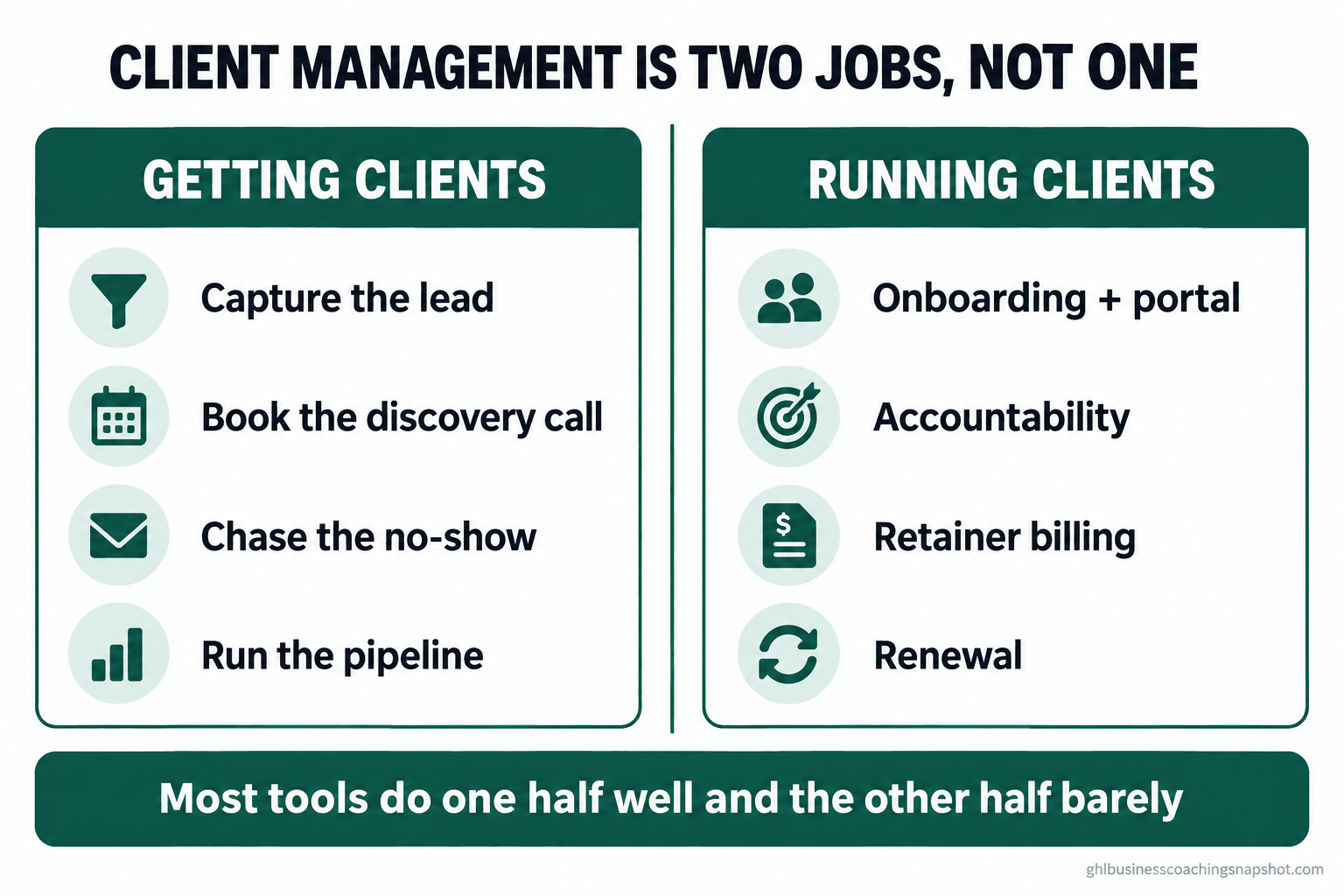
Here is the trap. Search “client management software for coaches” and every tool calls itself all-in-one. They are not lying, exactly. They are each all-in-one for their half of the business. A practice actually has two halves, and they need very different software.
The first half is getting clients: capturing a lead, booking the discovery call, chasing the no-show, following up the “not right now,” and moving a person through a pipeline until they buy. The second half is running clients: onboarding, the portal, session notes, accountability between sessions, worksheets, retainer billing, and the renewal conversation. A tool built for the second half is usually terrible at the first, and vice versa. The mistake is buying one and assuming it does both.
Industry figures: ICF 2025 Global Coaching Study (also reported via PR Newswire). Pricing: CoachAccountable. Confirm live prices before you budget.
The market is growing, which means more coaches are buying software, which means more of them are buying the wrong half first. The point of this post is to help you skip that. We will name what each tool genuinely does, score all three across the eight jobs, and then match the answer to where you actually are.
The three approaches, in plain terms
Three names come up constantly. They are not really rivals, because they solve different problems. Knowing which problem each was built for is the whole decision.
CoachAccountable: the delivery and accountability engine
CoachAccountable is a back office for the clients you already have. Its core features are Actions (client task tracking), Metrics (KPI tracking with trend charts), Worksheets, courses with drip content, group tools, scheduling, billing, and digital contracts (CoachAccountable review, 2026). It is structured, serious, and coaches who run outcome-based programs love it.
What it is not: it has no website or storefront. You embed a booking widget on a site you built elsewhere (Paperbell comparison). It is a delivery tool, not an acquisition tool. Pricing scales with active clients: $20 for 2, $40 for 5, $70 for 10, $120 for 20, $250 for 50, $400 for 100, then about $4 per client above that, and only active clients count toward the bill (CoachAccountable pricing).
Paperbell: the clean admin tool for solo coaches
Paperbell handles the business side in one tidy package: a simple website, package checkout, scheduling, contracts, payments, and a client portal. Pricing is the friendliest here, a flat $57/mo (about $47.50 billed annually), unlimited clients, with a free plan for one client (Paperbell pricing). A coach with 100 clients pays the same as a coach with three.
Where it stops: Paperbell is admin automation and package selling. It is light on marketing automation, has no real sales pipeline for chasing leads, and is not a texting platform. It is a lovely tool for a coach whose calendar is already full and who just wants the paperwork to run itself.
An all-in-one CRM: the acquisition and follow-up machine
This is the category GoHighLevel sits in, and it is the odd one out because it starts from the other half of the business. A CRM captures leads from a form, ad, or DM, books the call, sends the reminder, chases the no-show, runs a visual pipeline, and sends two-way SMS, the channel where texts see roughly a 98% open rate versus about 20% for email (Omnisend). It also does courses, portals, and billing. Pricing runs $97 (Starter), $297 (Unlimited), $497 (Pro/SaaS) (HighLevel).
The tradeoff is honest: a CRM is heavier to set up than Paperbell, and if all you need is admin, it is more tool than you want. Its strength is the half the other two ignore. We break the platform question down further in GoHighLevel vs Kajabi for coaches.
The eight jobs, scored side by side
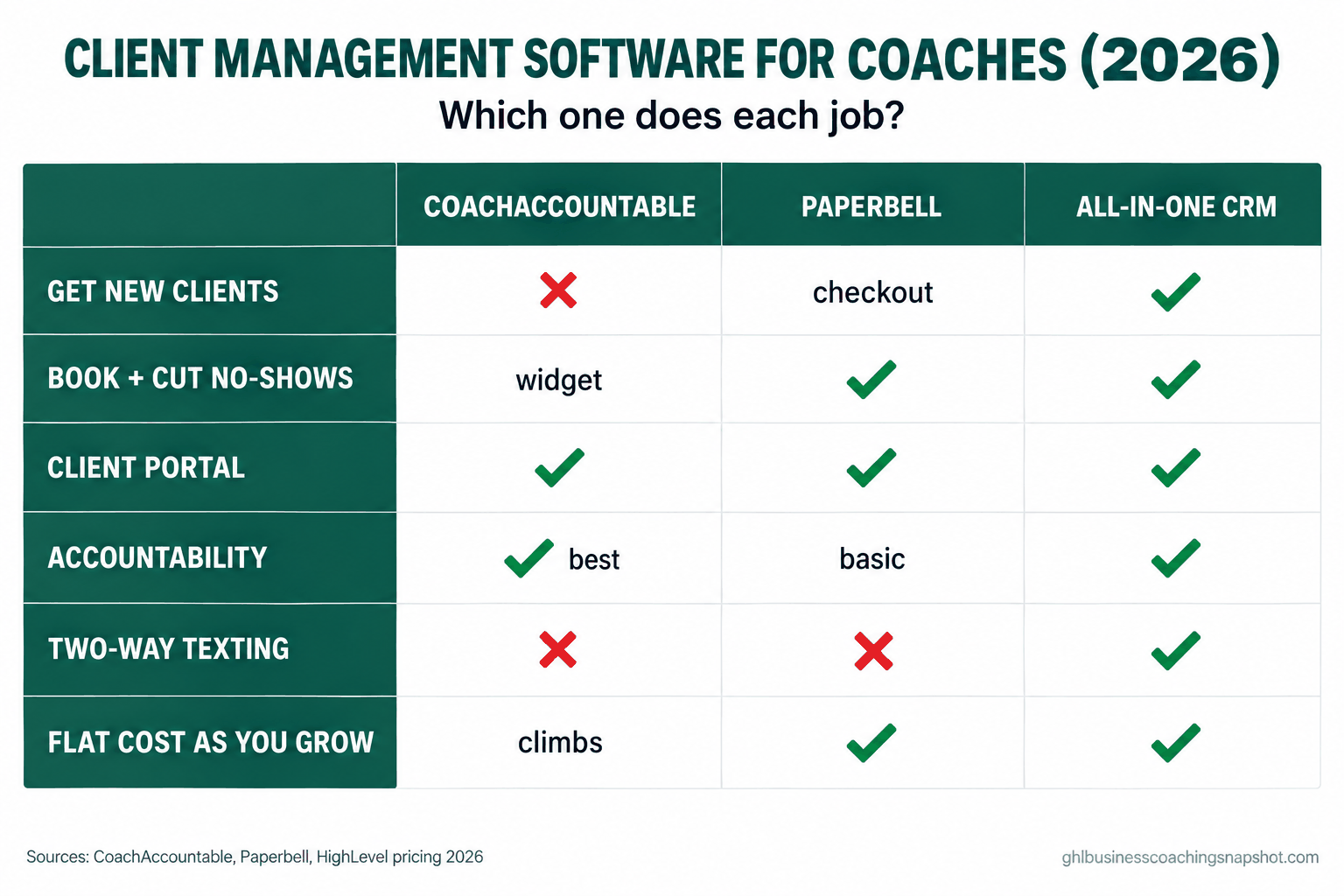
Read this as a jobs list, not a feature list. A feature you never use is not an advantage. Here is how the three approaches (plus the duct-tape stack many coaches actually run) handle the eight things a practice needs.
| The job | CoachAccountable | Paperbell | All-in-one CRM | DIY stack |
|---|---|---|---|---|
| 1. Getting clients (pipeline, follow-up) | No | Checkout only | Yes | No |
| 2. Booking + cutting no-shows | Widget | Yes | Yes | Calendly |
| 3. Contracts, packages, checkout | Yes | Yes | Yes | Patchy |
| 4. Client portal + session workspace | Yes | Yes | Yes | No |
| 5. Accountability between sessions | Best-in-class | Basic | Yes | No |
| 6. Retainer billing + failed-payment recovery | Yes | Yes | Yes | Manual |
| 7. Two-way texting at scale | No | No | Yes | No |
| 8. Flat cost as you grow | Climbs | Flat | Flat | Creeps |
Now the detail, because the “watch out” is where the money hides.
1. Getting clients
This is the fault line. CoachAccountable has no storefront, so it cannot generate a client; it manages one once they exist. Paperbell can take a payment through a checkout page, which is a start, but it does not run a pipeline or nurture a lead who is not ready to buy today. Only the CRM does the full job: capture, qualify, book, follow up, and track the deal through stages. Where it breaks: coaches buy CoachAccountable or Paperbell to “get organized,” feel more in control, and six months later the calendar is still lumpy because nothing in either tool is working to fill it. If your problem is the feast-or-famine pipeline, a delivery tool will not touch it.
2. Booking and cutting no-shows
All three book calls. The difference is what happens around the booking. Paperbell and CoachAccountable send reminders. A CRM can send a reminder by text, get a reply, reschedule from that reply, and re-book a no-show automatically. Where it breaks: email-only reminders quietly lose 20 to 40 percent of discovery calls to no-shows, because the reminder lands in a promotions tab nobody opens. If you are losing calls, the fix is text, and only one of these three sends it. See the full no-show playbook.
3. Contracts, packages, and checkout
This is the one all three do well. Paperbell may be the smoothest for a solo coach selling clean packages. CoachAccountable’s contracts are solid and tie into its billing. A CRM does it too, with more setup. Where it breaks: the failure here is not the tool, it is the gap between “they said yes” and “they signed and paid.” If that handoff is manual, deals stall in limbo. Automate the proposal-to-contract-to-invoice handoff whichever tool you pick.
4. The client portal and session workspace
CoachAccountable is genuinely strong here: a real workspace with notes, files, and history. Paperbell’s portal is clean and simple. A CRM can host a portal and a course area too. Where it breaks: the portal only helps if clients log in. A beautiful workspace nobody opens is worse than a shared doc they actually use. Whatever you buy, drive clients into it in week one, or it becomes a graveyard.
5. Accountability between sessions
This is CoachAccountable’s crown jewel, and it is real. Actions, Metrics, and Worksheets create structured accountability that shows a client their own progress, which is what drives renewals. Paperbell is basic here. A CRM can nudge and check in on a schedule, though it is less purpose-built for tracking a client’s KPIs over months. Where it breaks: accountability that feels like a robot nagging kills the relationship. The message has to read like it came from you. We cover the line between helpful and creepy in accountability check-ins.
6. Retainer billing and failed-payment recovery
All three can charge a card on a schedule. The gap is what happens when the card fails, and cards fail constantly, usually for expiry or insufficient funds, not fraud. Where it breaks: a failed retainer charge that nobody chases is pure lost revenue, and it is invisible until you reconcile. A tool that automatically retries, texts the client, and flags you is worth more than its whole price. This is exactly the leak we plug in retainer billing recovery.
7. Two-way texting at scale
Neither CoachAccountable nor Paperbell is a texting platform. A CRM is. For high-ticket coaching, where a hot lead needs a human reply tonight and a booked client needs a real nudge, that is the difference between closing and cooling. Where it breaks: coaches try to fake this from a personal cell, and it does not scale past a handful of clients. It also creates a compliance mess (see below).
8. Flat cost as you grow
Paperbell is flat forever. A CRM is flat within its plan. CoachAccountable climbs with active clients, which is cheap at three and real money at fifty. Where it breaks: the per-client model is a stealth tax on success. At 50 active clients you are paying $250/mo for delivery alone, before anything that gets you the 51st.
CoachAccountable monthly cost by active-client count, its published 2026 ladder. Source: CoachAccountable pricing. Paperbell stays flat at ~$57/mo and an all-in-one CRM stays flat within its plan at these client counts.
Number of the eight jobs above each approach covers well, based on the comparison table (a “checkout only” or “widget” counts as a partial, not a full). Author analysis; your weighting depends on which jobs you actually need.
Steal this: the messages that do the work
Software is only as good as the messages you run through it. These are the ones that move the needle in a coaching practice. Copy them, change the names, and paste them into whichever tool you land on. Keep them in your own voice; the point is that they read like a person, not a broadcast.
The between-session accountability nudge (day 3 or 4). Short, specific, human.
Hey [FirstName], quick one. You said this week you’d [the one action from our last session]. How’s it going? No wrong answer, I just don’t want it to slip while the week gets loud. Reply here and I’ll adjust if we need to.
The onboarding welcome (sent the minute they pay). This sets the tone and cuts early confusion.
Welcome in, [FirstName]. Three things so we start clean: (1) your portal login is in the email that just landed, set your password today; (2) book your first session with this link [link]; (3) fill the short intake before we meet so we don’t burn call time on setup. Excited to get to work.
The failed-payment recovery sequence (retainers). This is the one that pays for the software. Three touches, escalating, never shaming.
Day 0 (auto, on failure): Hi [FirstName], heads up, this month’s payment didn’t go through, usually just an expired card. You can update it here in 30 seconds: [link]. No action needed beyond that.
Day 3 (if still unpaid): Hi [FirstName], still seeing the payment as pending on my end. Here’s the link again [link]. If something’s changed on your side, just tell me, we’ll sort it, I’d rather talk than have it hang over the work.
Day 7 (personal, from you): [FirstName], want to make sure I’m not missing something, the [Month] payment is still open. Are we good to keep going? Two-minute fix here [link], or reply and let’s talk.
The month-3 renewal opener (before the honeymoon fades). Month two to three is where coaching clients quietly drift. Get ahead of it.
[FirstName], we’re about a quarter in. Before we plan the next stretch, I want to look back at what’s actually changed since we started, your [Metric] moved from [X] to [Y]. Can we spend ten minutes next session naming what’s working so we build the next phase on it?
That last one works because it leads with the client’s own progress, which is exactly what CoachAccountable’s Metrics are built to surface and what a CRM can pull from a custom field. The tool changes; the message is what retains. More on the retention system in reduce coaching client churn.
Three coaches, three right answers
The same eight-job framework gives three different answers depending on where you are. This is why “best tool for coaches” is a bad question.
Scenario 1: your first 10 clients. You are booking calls from your network and DMs, closing by hand, and delivering in Google Docs and Zoom. Your problem is not delivery volume, it is that everything is manual and a little chaotic. The right answer is usually Paperbell. At $57 flat it gives you a checkout, contracts, scheduling, and a portal for one clean price, and it will not punish you as you add clients. Skip the CRM for now; you do not have enough pipeline to justify it. Revisit when booking calls, not delivering them, becomes the bottleneck.
Scenario 2: scaling past solo. You have 20 to 40 active clients, a real waitlist sometimes and a scary-quiet month other times, and you have noticed the quiet months come right after the busy ones because you stopped selling. Now the CRM earns its keep. The job that is costing you money is jobs 1, 2, and 7, capture, booking, and follow-up, and no delivery tool does those. This is the moment to run the practice on a CRM and either keep a light delivery tool alongside it or move delivery in too. CoachAccountable at this size is $120 to $250/mo for delivery alone, so consolidating starts to make budget sense.
Scenario 3: the boutique with a team. Two to eight coaches, retainer clients, maybe a fractional-CxO line. You need structured accountability across coaches, clean billing, and a pipeline the whole team can see. This is where it gets interesting: CoachAccountable’s Team Edition is genuinely strong for the delivery half (unlimited coach accounts at the same per-client price), but it still cannot run acquisition. Most boutiques at this stage run a CRM for the front half and either CoachAccountable or the CRM’s own tools for delivery. Model both at your real client count before you commit; the per-client ladder changes the math fast. The full teardown is in the true cost of running a coaching business.
Five logins that never talk. No-shows chased by hand or not at all. Failed retainer cards found weeks later. Selling stops the moment delivery gets busy, so the quiet month always follows the busy one.
One system from first message to renewal. No-shows re-booked by text. Failed payments retried and flagged the same day. The pipeline keeps working while you coach, and renewal is cued by the client's own progress.
The compliance line the delivery tools do not cover
Whatever software runs your clients, a few rules sit on top of it, and the delivery tools will not warn you about any of them. This is general information, not legal advice; check your own situation.
Testimonials. The FTC’s 2023 Endorsement Guides require that a testimonial showing atypical results carry a clear disclosure of what people can generally expect, or be substantiated, and that any material connection (a discount, an affiliate payment, a free spot) be disclosed clearly and conspicuously (FTC Endorsement Guides). If your portal or landing page shows client wins, that is where this bites.
Auto-renewal on retainers. Here is the contrarian bit most coaching content gets wrong. The FTC’s “click-to-cancel” Negative Option Rule was vacated by the 8th Circuit on July 8, 2025, so the federal rule is not in force (Reuters). But that is not permission to relax, because more than 25 states have their own auto-renewal laws, and some are stricter than the federal rule ever was. If you bill retainers that renew, your cancellation terms have to satisfy the states your clients live in, not a federal rule that no longer exists.
“Coach the coaches” programs. If you sell a program that teaches people to earn money as coaches, the FTC Business Opportunity Rule can require an Earnings Claim Statement (16 CFR Part 437). And if your marketing edges into treating anxiety or depression, the coaching-versus-therapy scope line is a per-state legal question worth a real review. None of this lives in your software; it lives in your contracts and your copy.
Common objections
“CoachAccountable is the gold standard for coaches, why would I not just use it?” Because it is the gold standard at one job, delivery, and no job at another, acquisition. If your calendar is full it is a fantastic buy. If it is not, it will organize a problem you do not have while ignoring the one you do. Match the tool to the pain.
“Paperbell is so cheap and simple, isn’t that obviously the winner?” For a solo coach with a full roster, often yes. Simple and flat is a real advantage. The catch is the same as CoachAccountable’s: it manages clients, it does not generate them. Cheap admin that leaves your pipeline empty is not cheap.
“A CRM sounds like way too much for me.” It can be, and that is a fair objection at 10 clients. A CRM is heavier to set up, and if you only need paperwork, it is more tool than you want. The reason it comes up is that most coaches feel the acquisition pain before they will admit it, and by the time they do, they have paid for a delivery tool that cannot help. Buy the CRM when getting clients, not serving them, is the thing keeping you up.
“Can’t I just run everything from a spreadsheet and Calendly?” For a while, yes, and plenty of coaches do. The duct-tape stack works until a card fails silently, a contract goes unsigned, or a no-show is never chased, and each of those is real money. The DIY stack is cheapest on the invoice and most expensive in leaks and attention. It is a fine starting point and a bad place to stay.
“What about my data if I switch later?” Ask before you buy, not after. CoachAccountable keeps records accessible even for inactive clients, and most tools let you export contacts and notes. The real lock-in is not the export button, it is the automations you rebuild, so favor a tool whose logic you can actually see and edit rather than a black box.
Frequently asked questions
What is the best client management software for coaches in 2026?
There is no single winner, because 'client management' is two jobs. For running clients you already have, CoachAccountable (structured accountability) and Paperbell (clean flat-price admin) are the strongest picks. For getting clients, an all-in-one CRM like GoHighLevel is the only one of the three with a real pipeline and two-way SMS. Buy for the job that is costing you money right now.
CoachAccountable vs Paperbell, which is better?
They aim at different coaches. CoachAccountable is best for outcome-driven coaching with real between-session accountability (Actions, Metrics, Worksheets), and it prices by active clients ($20 for 2, up to $400 for 100). Paperbell is best for a solo coach who wants simple admin and package selling at a flat $57/mo with unlimited clients. Pick CoachAccountable for structured delivery, Paperbell for simple, flat-priced operations.
Can an all-in-one CRM replace CoachAccountable or Paperbell?
It can cover most of the delivery jobs (portal, billing, scheduling, courses, check-ins) while adding the acquisition jobs those tools skip. It will not match CoachAccountable's purpose-built KPI tracking out of the box. Many coaches run a CRM for the front half of the business and keep a light delivery tool, or move everything into the CRM once the pipeline justifies it.
Do coaches really need two-way SMS?
If you rely on discovery calls and high-ticket follow-up, yes. Texts see around a 98% open rate versus about 20% for email, and speed of reply is what closes a hot lead and what cuts no-shows. Neither CoachAccountable nor Paperbell is built for two-way texting; a CRM is.
What is the cheapest client management tool for a brand-new coach?
Paperbell's free plan (one client) or its $57 flat plan is the cheapest genuinely useful option, and it will not punish you as you grow. CoachAccountable is cheaper at two or three clients ($20/mo) but climbs. A spreadsheet plus Calendly is cheaper still on paper, but leaks revenue through unsigned contracts and failed payments.
Does the FTC 'click-to-cancel' rule affect my coaching retainers?
The federal Negative Option (click-to-cancel) Rule was vacated by the 8th Circuit on July 8, 2025, so it is not in force. But more than 25 states have their own auto-renewal laws, some stricter, so if you bill renewing retainers your cancellation terms still need to satisfy the states your clients live in. This is general information, not legal advice.
Will I get locked into whichever tool I choose?
Ask about data export before buying. Most tools export contacts, notes, and contracts, and CoachAccountable keeps records accessible for inactive clients. The harder lock-in is the automation logic you build, so prefer a tool whose workflows you can see and edit yourself over a closed system.
The honest summary: CoachAccountable and Paperbell are excellent at running the clients you have, and neither will get you the next one. If your practice lives on discovery calls and follow-up, the operating system is a CRM, and the delivery tool is the bolt-on. Pick for the job that is bleeding money this quarter, wire the messages above into it, and stop paying for the half you do not need.